Free implementation guide / 04
Build and QA a Landing Page That Converts
Match the offer to the traffic, verify the form and measure qualified outcomes.
A tested landing page and confirmed conversion path.
A clear offer, access to the form/backend and an agreed conversion definition.
Jump to the working checklist ↓See how a clearer offer changes the message.
Silent, captioned walkthrough of the practice lab. These are real screen recordings of an illustrative exercise.
Read the walkthrough
Compare the vague message with the specific customer, deliverable and next action. Check each item in the review list. This is a fictional writing example; it does not establish a measured conversion lift.
Build this: one landing page tied to one traffic source, one offer and one measurable next step. The goal is to remove uncertainty for the visitor—not add more visual effects.
01Write the page brief in six lines
List: traffic source, visitor intent, customer fit, deliverable, evidence and conversion event. If you cannot state the offer in one sentence, do not start with a redesign. Clarify what someone gets and what they must do next.
For example: a search visitor looking for a tracking audit sees a page offering an audit with a written issue list and implementation priorities. The next step is a qualified audit request. This is a hypothetical service, not an offer sold on this site.
02Build the first screen around the decision
Use a headline describing the deliverable or problem solved. Add a short explanation of who it fits and how it works. Give the visitor one dominant next step. The button should describe what happens: “Request an audit” is clearer than “Unlock success.”
Place relevant proof near the claim it supports. A company logo shows association, not proof of every promised result. A case study should state the starting problem, action, period and outcome where known. Do not invent metrics to fill a design component.
Explain constraints that affect the decision: scope, eligibility, turnaround if established, and what happens after submission. Do not bury a surprise fee or meaningful requirement behind the button.
SEE THE ACTUAL EXAMPLE
Review the exact message and the working action
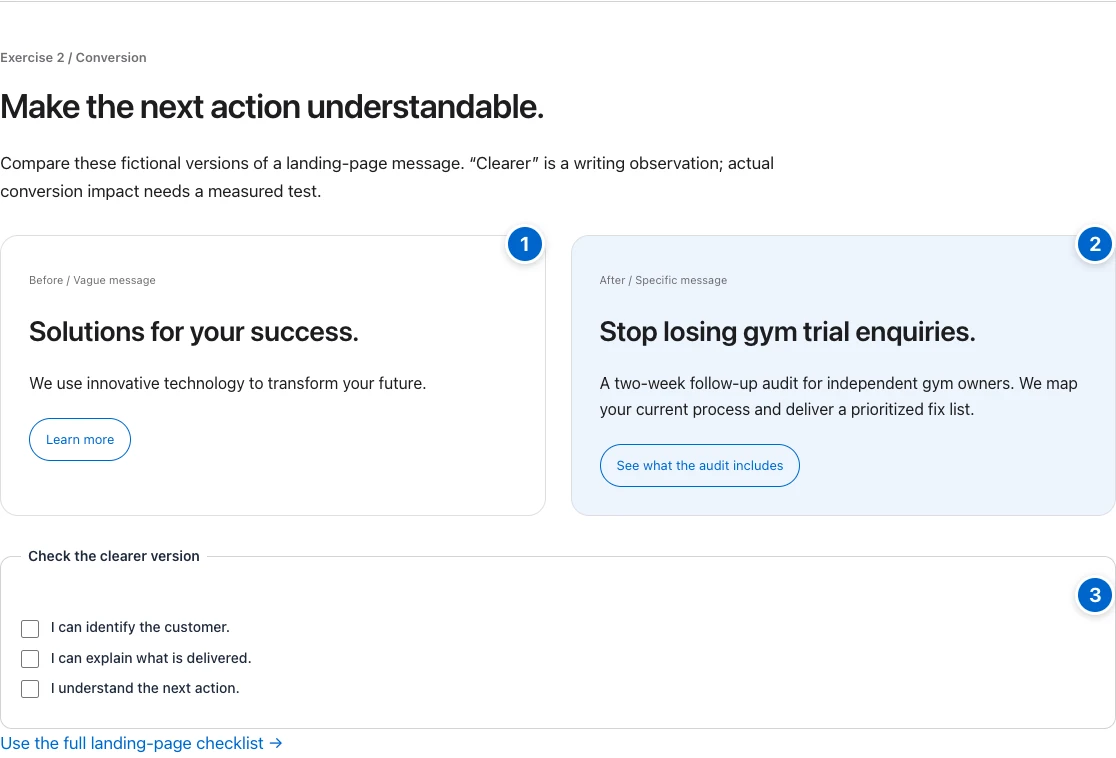
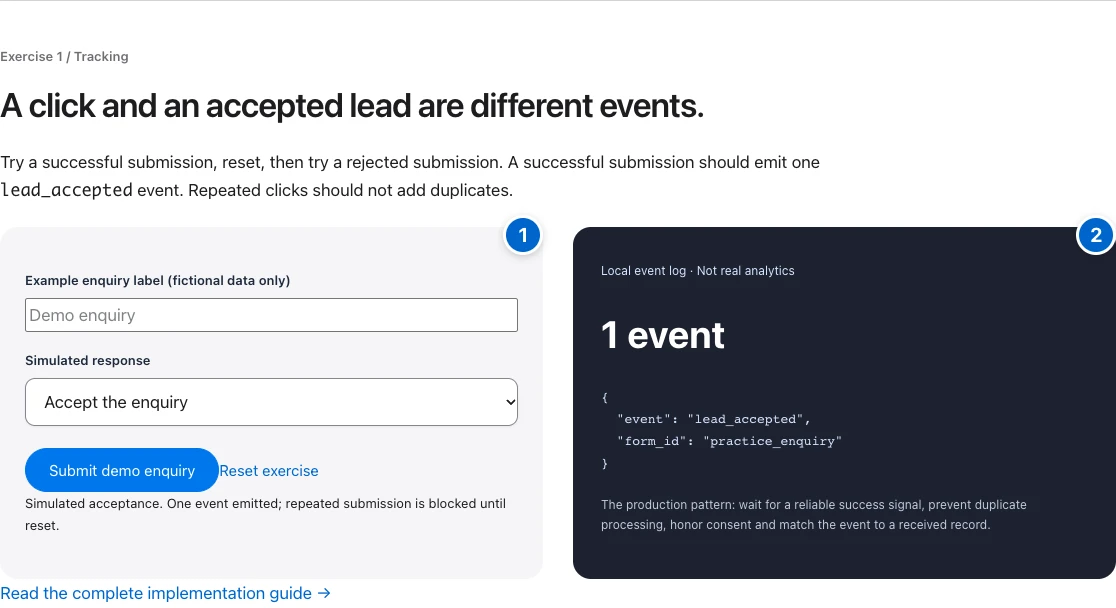
Your action: Run the same comprehension check on your page. Then test the actual form’s success and rejection states.
03Make the form trustworthy and testable
Ask only for fields needed for the next step. Use visible labels, useful autocomplete attributes and actionable validation messages. An input placeholder is not a substitute for a label. Keep error messages connected to their fields.
Validate again on the server. Prevent accidental repeated submissions and preserve entered values after a recoverable error. A successful HTTP response is not enough if the application rejected the lead; inspect the actual result.
Fire the conversion only after the backend accepts the request. Test both the confirmation UI and the received record. Include consent and privacy information appropriate to what you collect. Do not pass submitted personal data into analytics.
<label for="work-email">Work email</label>
<input id="work-email" name="email" type="email"
       autocomplete="email" required>
<!-- Example markup only. Add server-side validation,
accessible error handling and your privacy/consent flow. -->04Remove technical friction
Test at 320px and 390px wide. Confirm the headline, form and CTA do not overflow. Use keyboard navigation: every action should be reachable and focus should be visible. Check readable contrast and clear link names.
Give images intrinsic dimensions to reduce layout shifts. Compress them and use appropriately sized variants. Load the primary image promptly and defer lower-page media where useful. Avoid blocking the main action behind heavy third-party widgets.
Check the browser console and Network panel for failed requests. Test on an actual mobile device when available. A fast desktop screenshot is not evidence that a form works on a slow phone connection.
05Measure the whole path
Calculate conversion rate from the defined conversion divided by the matching eligible session or visitor denominator. Keep that denominator stable across comparisons. Segment by source and device before averaging different traffic together.
For lead generation, review qualified-lead and customer rates too. A shorter form can increase raw submissions while decreasing quality. Judge the tradeoff using customer economics, not only the form conversion rate.
Choose one hypothesis for the next change and define the decision metric before testing. Small samples are noisy; do not declare a winner from a handful of conversions. Done when: the promise is clear, the action works, the outcome is received, and measurement distinguishes volume from quality. Download the landing-page QA sheet ↓
Implementation artifact
Test one complete enquiry.
Use a staging environment where possible. Label test records clearly and avoid creating a paid booking or sending unwanted messages.
- Before the click: record the promise in the ad or search result.
- On the page: confirm the headline matches that promise and the CTA describes the next action.
- In the form: test labels, required fields, keyboard navigation and recoverable validation errors.
- After submitting: verify the confirmation, received record and intended follow-up owner.
- In reporting: check one successful conversion and exclude the test from business reporting.
Save the page URL, device, test time, expected result, observed result and evidence. Prioritize a lost enquiry or inaccessible form before cosmetic changes.
- 01Promise
Does the message match the visitor’s intent?
- 02Proof and scope
Can readers judge the offer honestly?
- 03Working action
Test success, rejection and repeated submissions.
- 04Measured outcome
Verify the accepted lead before launch.
Make the idea concrete.
A hypothetical 1,000 sessions produce 40 accepted inquiries and 8 customers. Session-to-inquiry rate is 4%; inquiry-to-customer rate is 20%; session-to-customer rate is 0.8%. Keep the cohort and observation window consistent before comparing results.
Done means verified.
Check each item as you verify it. Progress stays in this page; download your checklist before leaving.