Technical tutorial / SEO
Audit One Page for Crawlability, Indexing and Search Intent
Run a reproducible page audit with response checks, robots directives, canonical review and a query-to-answer map.
By Aaron Peden · Published · Updated October 27, 2026
Build this: A saved URL audit with evidence for each technical check and a specific content fix.
Before you start: A URL you control, browser access, and Search Console access if you want Google-specific inspection.
A page can load in your browser and still be ineligible for indexing. It can also be indexable and still fail to answer the query it targets. Treat technical eligibility and usefulness as separate checks. This audit starts with one important page so every observation can be tied to a URL, a date and the actual response.
The local AaronPeden preview is intentionally noindex. Do not copy that setting to a public site by accident, and do not remove it from a private preview just to satisfy a checklist. Google cannot fetch a localhost address. Run public tests against an authorized public URL, and use source inspection for private development.
1. Record the intended URL and answer
Choose one canonical URL and one reader question it should answer. Write down whether the page is a tutorial, product, comparison or local service page. Search intent determines the evidence needed: a how-to needs working steps, while a product page needs scope, pricing information and a purchase path. Save your target URL exactly, including protocol and trailing slash behavior.
List the page that currently competes with it on your own site. Two pages mentioning the same keyword are not automatically a problem, but two near-identical answers can divide relevance and maintenance effort. Decide what each page uniquely does before creating another variation.
2. Check the response and redirect chain
Open the URL in a clean browser session and inspect the Network panel with Preserve log enabled. Reload the page and select the main Document request. Record its status and final URL. A successful HTTP response is usually 200; a redirect may be appropriate, but it should end at the intended page without loops or an unrelated destination.
Use the command below if you have a terminal. It requests the page and shows response headers; use a URL you are allowed to inspect. A HEAD response can differ from GET, so the example uses GET while discarding the body. A 200 response still does not mean a search engine has indexed the page.
See the actual example
3. Inspect robots directives and canonical
View page source and search for robots and rel="canonical". Also inspect the response headers for X-Robots-Tag. A noindex directive in either place matters. Check robots.txt separately: disallow controls crawling, while noindex controls indexing when the crawler can see it. Do not block crawling and assume the crawler will discover a new noindex directive behind that block.
The canonical should identify the preferred equivalent URL, not a vaguely related category page. Compare the canonical, internal links, redirects and sitemap URL. A canonical is a signal rather than a guarantee. Document a mismatch with the actual values instead of writing “SEO issue” without evidence.
4. Test structured data for its actual purpose
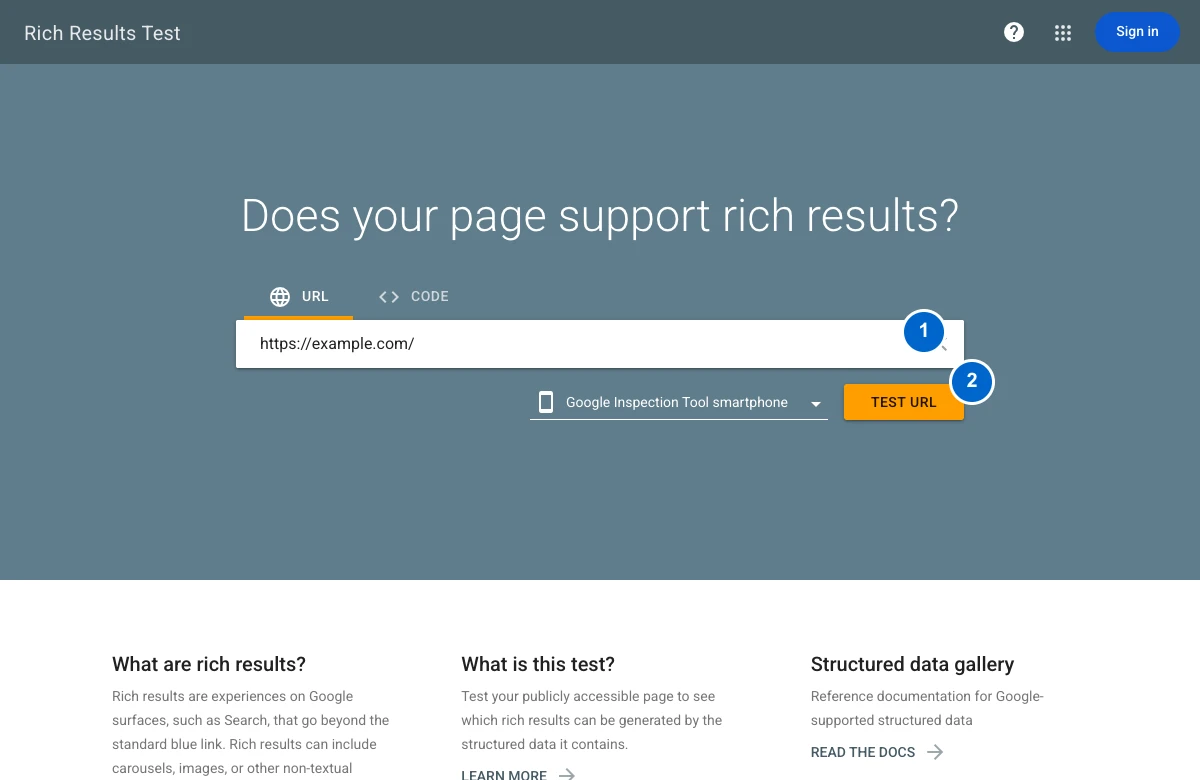
Open Google’s Rich Results Test, enter the public URL and choose TEST URL. The screenshot shows that input workflow, not a successful test result. Review applicable errors and warnings against the specific rich-result type. Unsupported Schema.org vocabulary can be valid without producing a Google rich result, so do not remove useful markup solely because no supported result is detected.
Check that structured data describes the visible page. Never add fabricated ratings, prices or FAQs just to seek a search feature. Save the tool result and the page version you tested. Fix invalid required fields, then retest. Rich-result eligibility is separate from indexing, rankings and a promise of enhanced display.
Worked example — illustrative or dated as stated
Illustrative diagnosis: the page responds 200 and declares itself canonical, but the response includes X-Robots-Tag: noindex. That page is not ready for public indexing. The fix is not another keyword paragraph. Confirm the environment’s intended policy, correct only the authorized public configuration, and fetch the response again.
5. Compare the page with the reader’s task
Read the title, H1, introduction and main steps without your keyword list. Can a reader tell what they will build? Are prerequisites stated? Does the guide show the actual settings and expected outcome? Add screenshots where location or state matters, and a worked example where a formula or decision is easy to misunderstand.
Use descriptive internal links to prerequisites and next steps. Replace generic “click here” links with the actual task. Verify image alt text, mobile readability, keyboard access and the primary action. A page that is technically eligible but unusable still fails the reader.
6. Verify in Search Console and keep a record
If you own the property, use URL Inspection to review Google’s known state and compare it with a live test where available. Record the user-declared and Google-selected canonicals when provided. Requesting indexing is a request, not proof that indexing happened. Track the outcome later without repeatedly resubmitting an unchanged page.
Your audit should end with one concrete change, its owner and a verification date. For example: remove an accidental noindex from the authorized public page, retain it on staging, and confirm the public response after deployment. Avoid changing unrelated pages before you understand the cause of this page’s state.
YOUR IMPLEMENTATION WORKSHEET
Build your working document.
Enter planning notes without customer identities or secret values. Your answers stay in this browser and are not saved. Download the completed brief before leaving.
No information is submitted to a server.
Copyable implementation example
Adapt this example to your actual environment and verify its assumptions before use.
curl -sS -L -D - -o /dev/null 'https://example.com/your-page/'Completion checklist
0 / 8 checkedCheck only what you have verified. Download before leaving; this page does not save your progress.
Sources and scope
Primary-source guidance checked October 27, 2026. Interfaces and policies can change; consult the linked current source. Practice screenshots and modeled examples are labeled and are not client campaign results.