Free implementation guide / 02
Technical SEO: From Crawlable URL to Useful Page
Check HTTP status, robots directives, canonicals, search intent and internal discovery.
A documented audit of one revenue-relevant URL.
The exact public URL, source/header access and relevant search-console access where available.
Jump to the working checklist ↓Build this: a crawlable, indexable page that answers one search intent and has a clear conversion path. These checks establish eligibility and usefulness; they do not guarantee indexing or rankings.
01Check the response before the copy
Open the exact public URL you want indexed. It should normally return 200, not a redirect chain, soft 404 or login page. Use the header check below, then load the page in a browser. A 200 response with an empty error template is still a broken page.
Inspect both the HTML robots directive and the X-Robots-Tag response header. A public page you want indexed should not have noindex. Keep noindex on private previews and staging environments—including this local preview. Do not remove it merely to make an audit pass.
curl -I 'https://example.com/services/site-audit/'
# Check status, Location redirects, and X-Robots-Tag.
# Also inspect the rendered page and its HTML source.02Align canonical, sitemap and internal links
Use one preferred HTTPS URL. Its canonical should point to that exact preferred page, and internal links should use the same URL. A canonical is a signal, not a command. Do not canonicalize distinct service pages to the homepage.
Your XML sitemap should list public, canonical, indexable URLs that return successful responses. Exclude staging, internal search, checkout and thin filter combinations. A sitemap submission is not an indexing guarantee.
robots.txt controls crawling, not reliable removal from search. A blocked page may prevent a crawler from seeing its noindex. For confidential content, require authentication rather than relying on robots directives.
<link rel="canonical" href="https://example.com/services/site-audit/">
<title>Technical Website Audit for Small Businesses | Example</title>
<meta name="description" content="Find crawl, tracking and conversion problems in your website. Review the audit scope, deliverables and next step.">03Map one page to one useful job
Review the actual search results for your target query. Are people looking for a service, a tutorial, a product comparison or a tool? A sales page usually cannot substitute for a detailed how-to guide, and a broad article is not necessarily the best answer to a local service query.
Write the page brief before drafting: intended customer, query intent, primary question, evidence needed, deliverable and next action. Compare existing pages first. If two pages answer the same intent, decide whether to consolidate them rather than creating another near-duplicate.
Use a descriptive H1 and a clear opening answer. Add the details needed to act: prerequisites, steps, examples, limitations and verification. Titles should describe the actual page. Avoid mass-producing city or keyword swaps that do not add useful information.
SEE THE ACTUAL EXAMPLE
Use the real structured-data testing interface
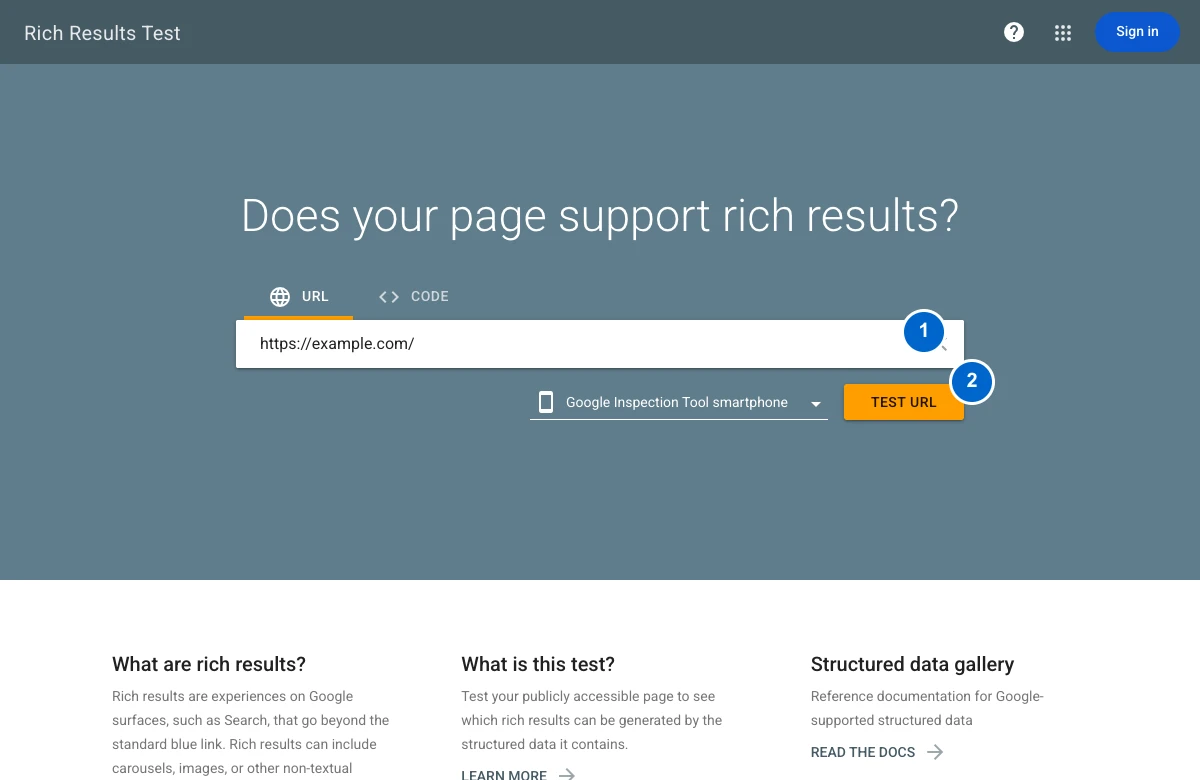
Your action: Test your public page, resolve applicable errors, then separately check crawl/index eligibility in Search Console. localhost cannot be fetched by Google.
04Make the page discoverable and usable
Link from relevant existing pages using descriptive anchor text. Use real anchor links with href attributes. A page that exists only in a sitemap can be harder for people to discover and evaluate.
Give images accurate alt text when they convey information. Specify width and height to reserve layout space. Resize source files to the rendered need; do not lazy-load the main above-the-fold image. Check the page on a narrow phone viewport with a slow connection.
Inspect the URL in your search-console property. Compare the declared and selected canonical when available, crawl status and indexing status. Verify the live page and distinguish discovery, crawl, submission and indexing.
05Decide what to improve from evidence
Use query and page data together. Impressions with weak click-through can suggest a title or intent mismatch; clicks with weak conversion can suggest a page, offer or measurement problem. Neither metric alone identifies the cause.
Log your change and the date. Compare similar periods, account for seasonality, and avoid attributing every ranking movement to the last edit. Done when: response, directives, canonical, internal discovery, page intent and mobile usability are checked. Download the page-audit checklist ↓
Implementation artifact
Inspect one URL before changing ten.
For a page you control, start with a GET request and inspect the actual response. Replace the example URL with yours.
curl -sS -D page-headers.txt -o page.html https://example.com/service/
# Inspect status and redirects in page-headers.txt.
# Inspect robots directives and canonical in page.html.
A successful response alone does not establish indexability. Check response-header X-Robots-Tag, HTML robots directives, canonical destination, robots.txt access, rendering and relevant internal links. Compare with Search Console URL Inspection.
| Finding | Next check |
|---|---|
| Redirect | Confirm the intended final URL and update internal links. |
| noindex | Establish whether it is intentional before changing it. |
| Canonical points elsewhere | Check duplicate-page intent and the target’s response. |
| Page is eligible but not indexed | Review discovery, content usefulness and inspection evidence; do not promise indexing. |
- 01Crawl
Can the crawler retrieve the intended URL?
- 02Index eligibility
Check status, robots directives and canonical.
- 03Useful page
Match a real query with an original answer.
- 04Verify in Search Console
Inspect the URL; indexing is not guaranteed.
Make the idea concrete.
For https://example.com/services/audit/: verify 200 status, index eligibility, matching self-canonical and an internal link from a relevant page. Then check that the page actually answers audit-service intent. Passing those checks does not establish indexing or rankings.
Done means verified.
Check each item as you verify it. Progress stays in this page; download your checklist before leaving.