Technical tutorial / Analytics & Tracking
Measure Accepted Leads Without Counting Every Click
Define a lead event contract, prevent duplicate processing and reconcile analytics with received enquiries.
By Aaron Peden · Published · Updated October 27, 2026
Build this: A tested event specification and a reconciliation table you can review with your developer.
Before you start: A working enquiry form, access to its accepted records and the relevant analytics setup or developer.
A click tells you that someone interacted with a control. An accepted enquiry tells you that a system received something it considers valid. A qualified lead is a further business judgment. Mixing these states produces attractive counts that cannot answer whether marketing is producing useful opportunities.
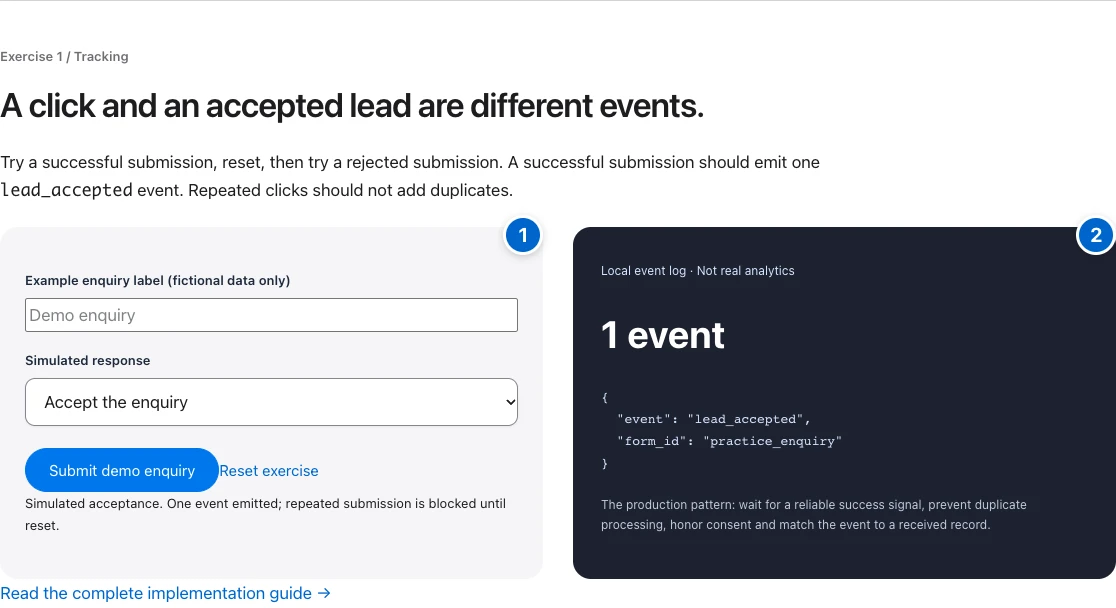
Start by documenting the states and the system responsible for each. This tutorial uses a local event exercise to make the distinction visible, then shows how to translate it into a production contract. The screenshots are a browser simulation, not a GA4 report or proof of a real received lead.
1. Define the business states
Write the sequence: attempt, validation, accepted record, qualification and customer. Assign an owner and system to each transition. For example, the form backend can confirm acceptance, while sales determines qualification later. Do not ask a browser click event to establish a business fact it cannot observe.
Choose an event name that matches the semantics. Google offers recommended events such as generate_lead; use the appropriate documented event where it fits. The practice exercise uses lead_accepted as a teaching label. A name alone does not make the implementation correct or connect it to an analytics property.
2. Write an event contract
Specify the trigger, required safe parameters, consent requirements and duplicate handling. Include a non-sensitive event or record reference only if your privacy design permits it. Do not include names, email addresses, phone numbers, free-text enquiries or other identifying information in analytics payloads.
Keep the contract versioned with the form change. A developer should be able to answer exactly which backend response permits emission. If a third-party embed does not expose a reliable success signal, investigate its supported integration rather than attaching a click listener and calling the result a lead.
See the actual example
3. Emit after reliable acceptance
Wait for a backend response that means the record was stored or otherwise accepted under your contract. Handle rejection and timeout separately. A response code by itself may not prove acceptance if the API returns a business error inside a successful HTTP envelope, so read the documented response body as well.
The code example shows a conceptual guard, not a full production integration. The backend must enforce idempotency and validation; a browser Set only prevents repeated work within that page instance. The measurement call should honor the user’s consent state and use your actual configured analytics function.
4. Test the negative cases
Run accepted, rejected, invalid, timeout and duplicate-submission scenarios with fictional data. In the practice lab, acceptance produces one visible local event and rejection produces none. Reset before changing scenarios so you know what each count represents. Check double clicks and retry behavior instead of testing only the happy path.
Save a test log containing scenario, expected result, actual result and evidence. If a timeout occurs after the backend stored the lead, a blind retry may create a duplicate. Use a stable operation reference and server-side duplicate protection. Do not assume absence from a browser log proves no backend record exists.
Worked example — illustrative or dated as stated
Illustrative reconciliation: the backend receives 12 submissions, two are duplicates and two are rejected. Eight accepted unique enquiries remain. If analytics reports twelve conversions, investigate whether it fires on submission attempts. If it reports six, inspect consent and transport before assuming two accepted leads were lost.
5. Verify transport and destination separately
Use the browser Network panel to check whether the intended analytics request is sent under your consent conditions. Then inspect the receiving tool’s debugging or realtime facilities where available. Google’s event documentation explains the configured tag and event call; the actual property and stream must already exist.
Debug visibility is not the same as a finalized business report. Filters, consent, attribution and processing delays can affect reporting. Record what was verified: browser trigger, network delivery, debug receipt or reconciled reporting. Avoid claiming all four because one panel showed an event name.
6. Reconcile accepted records with analytics
Choose a period and count accepted backend records, duplicate records removed, analytics events and qualified leads separately. Explain differences before tuning campaigns around the event. A consent-respecting analytics system may intentionally observe fewer events than the backend; bots, retries and filters can create other discrepancies.
Do not expect every system to match exactly without understanding its definition. The goal is a documented measurement chain, not forced numerical agreement. Fix the event contract or integration when it misrepresents the business state, then rerun the same test matrix and keep the before-and-after evidence.
YOUR IMPLEMENTATION WORKSHEET
Build your working document.
Enter planning notes without customer identities or secret values. Your answers stay in this browser and are not saved. Download the completed brief before leaving.
No information is submitted to a server.
Copyable implementation example
Adapt this example to your actual environment and verify its assumptions before use.
// Conceptual browser guard; backend idempotency is still required.
const seen = new Set();
function onAccepted(response, consentGranted) {
  if (!response.accepted || !response.eventRef) return;
  if (seen.has(response.eventRef)) return;
  seen.add(response.eventRef);
  if (consentGranted) sendConfiguredLeadEvent();
}
Completion checklist
0 / 8 checkedCheck only what you have verified. Download before leaving; this page does not save your progress.
Sources and scope
Primary-source guidance checked October 27, 2026. Interfaces and policies can change; consult the linked current source. Practice screenshots and modeled examples are labeled and are not client campaign results.