Technical tutorial / Local Marketing
Build a Local Service Page That Earns the Right Enquiries
Connect a truthful service offer, eligible business information and a tested enquiry path without invented locations.
By Aaron Peden · Published · Updated October 27, 2026
Build this: A local-page brief and verification checklist grounded in the areas and services you actually support.
Before you start: A real service business, verified service availability and permission to use its business information.
A local service page should help a nearby person decide whether you can solve their problem. Naming a city repeatedly is not a substitute for availability, scope, trust and a working contact path. Start with business facts, then build the page around the customer’s immediate decision.
A website page and a Google Business Profile are different assets with different requirements. Do not create a profile for a virtual location simply because you want to rank there. This tutorial covers a legitimate business’s page and the checks needed before connecting it to a profile.
1. Verify the real service and area
Write the services actually delivered, exclusions, supported area, operating hours and contact destination. Confirm those details with the person responsible for fulfillment. If availability is uncertain, do not publish a confident coverage claim. A nearby postcode or an old job does not establish current service capability.
Choose one main service intent for the page. A person needing an urgent repair has different questions from someone comparing a planned installation. State the timing and availability honestly. Do not use “24/7” as a design element unless the relevant response or service is truly available around the clock.
2. Check Business Profile eligibility separately
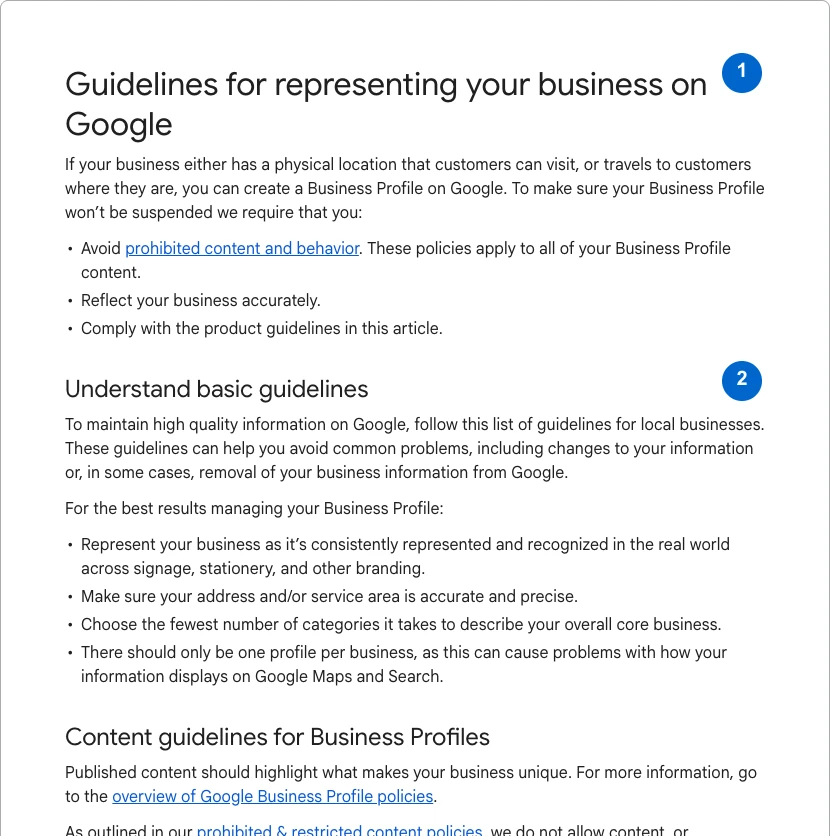
Read Google’s guidelines for representing a business. They describe eligible customer-facing locations and businesses that travel to customers, along with naming, address and service-area rules. Use the real-world business name rather than adding service keywords to the name field. A rented mailing address is not automatically an eligible operating location.
The screenshot below is the actual public guideline page, not a claimed or verified Business Profile dashboard. Follow the current verification process through the authorized owner. Do not create duplicate profiles or imply a profile is verified because the website exists. Keep the website task moving while any legitimate ownership or verification step remains separate.
See the actual example
3. Write the page around the customer’s decision
Use a specific headline naming the service and a genuinely supported area. Explain common situations you can help with, what the service includes, what it excludes and what happens after an enquiry. Provide useful pricing context or an honest explanation of what determines the quote.
Add original local evidence when you have permission: actual work photographs, a documented process or relevant customer feedback. Do not use stock imagery as proof of completed jobs. If an image is representative, label it. Avoid creating dozens of near-identical city pages with only the location name changed.
4. Make the contact path trustworthy
Use the approved business contact destination and explain who receives the enquiry. Ask only for information needed to respond. Include the supported service area in the form instructions when it helps qualify requests. If the business cannot serve a location, make the limitation clear rather than collecting a lead under a misleading promise.
Test valid input, invalid input, rejection and repeated submissions with fictional data in a safe environment. Check the received record as well as the visible confirmation. If a phone action is offered, confirm the number through the approved operational process; do not make unapproved test calls to external providers.
Worked example — illustrative or dated as stated
Illustrative page brief: a repair business serves a documented group of nearby areas during stated hours. The page explains the repair scope and asks for a location to confirm availability. It does not claim offices in every suburb or immediate attendance. Success is a suitable received enquiry, not a click on a city name.
5. Check consistency and search signals
Compare the business name, address or service-area representation, hours and contact details across the website and authorized listings. Differences may be legitimate, but they should have a reason. Use structured data that matches the visible business facts; do not invent an address to fill a field.
Check response status, canonical, robots directives and internal links for the page. Link from the relevant service hub with descriptive text. A sitemap entry does not establish ranking or local eligibility. Save the actual public response and verify that staging restrictions have not leaked into the public page.
6. Review enquiry quality and maintain the facts
Record accepted enquiries, suitable enquiries and actual jobs separately. If many requests are outside the service scope or area, investigate the page’s wording and traffic sources. A lower form count can still be an improvement if it removes misleading or impossible requests.
Assign an owner to update hours, availability and contact details when operations change. Retest the form after routing or platform changes. The page should remain a dependable description of the business, not a frozen lead-generation promise that outlives the service it advertises.
YOUR IMPLEMENTATION WORKSHEET
Build your working document.
Enter planning notes without customer identities or secret values. Your answers stay in this browser and are not saved. Download the completed brief before leaving.
No information is submitted to a server.
Completion checklist
0 / 8 checkedCheck only what you have verified. Download before leaving; this page does not save your progress.
Sources and scope
Primary-source guidance checked October 27, 2026. Interfaces and policies can change; consult the linked current source. Practice screenshots and modeled examples are labeled and are not client campaign results.