Technical tutorial / Affiliate Marketing
Build an Affiliate Comparison That Deserves Trust
Compare tools against the reader’s job, disclose the relationship and verify every recommendation and link.
By Aaron Peden · Published · Updated October 27, 2026
Build this: A comparison matrix with fit, limitations, costs, alternatives and evidence for each claim.
Before you start: A defined reader task and access to public product documentation or permissioned firsthand testing.
A recommendation is useful when it helps someone choose—or decide not to buy. An affiliate link does not make the recommendation invalid, but hiding the relationship or inventing firsthand experience undermines trust. Start with the reader’s task and compare options against the same criteria.
This tutorial does not enroll you in a program or authorize any claim about a product. Use issued, approved links and current program terms. Product availability and pricing can change. Label public-documentation research separately from hands-on testing so the reader knows what your comparison actually establishes.
1. Define the job before naming products
Write the task, user, existing workflow and constraints. “Send a permission-based welcome sequence for a small list” is more useful than “best marketing software.” Record the must-have requirements and what would make a tool unsuitable. A free spreadsheet or an existing product may already solve the problem.
Separate an essential capability from a preference. For example, honoring suppression can be essential while a particular dashboard layout is a preference. This distinction prevents a comparison from becoming a list of features selected to favor the highest-paying affiliate offer.
2. Choose consistent comparison criteria
Use the same criteria for each option: fit, setup effort, required plan, relevant limits, exportability, support, privacy constraints and lower-cost alternatives. Record the date and source for changing facts such as price or included usage. If you cannot verify a field, mark it unknown rather than assuming it matches a competitor.
Avoid a single numerical score unless the weighting has a defensible purpose. A high average can hide a failed must-have requirement. Show disqualifiers explicitly. The matrix worksheet below is designed to produce a decision record, not an automated “best tool” ranking.
See the actual example
3. Gather evidence and label its scope
Test the relevant workflow where you have authorized access. Save the starting state, action, result and failure case with fictional data. If you only reviewed public documentation, say that. Do not use “I use this every day” or imply that a tool caused company growth unless that is verified.
A homepage screenshot proves what a vendor publicly presents, not whether the feature performs reliably in your account. Distinguish the vendor’s claim from your observation. For performance or outcome claims, inspect the underlying evidence and avoid repeating unsupported numbers just because they appear in marketing copy.
4. Place the disclosure before the decision
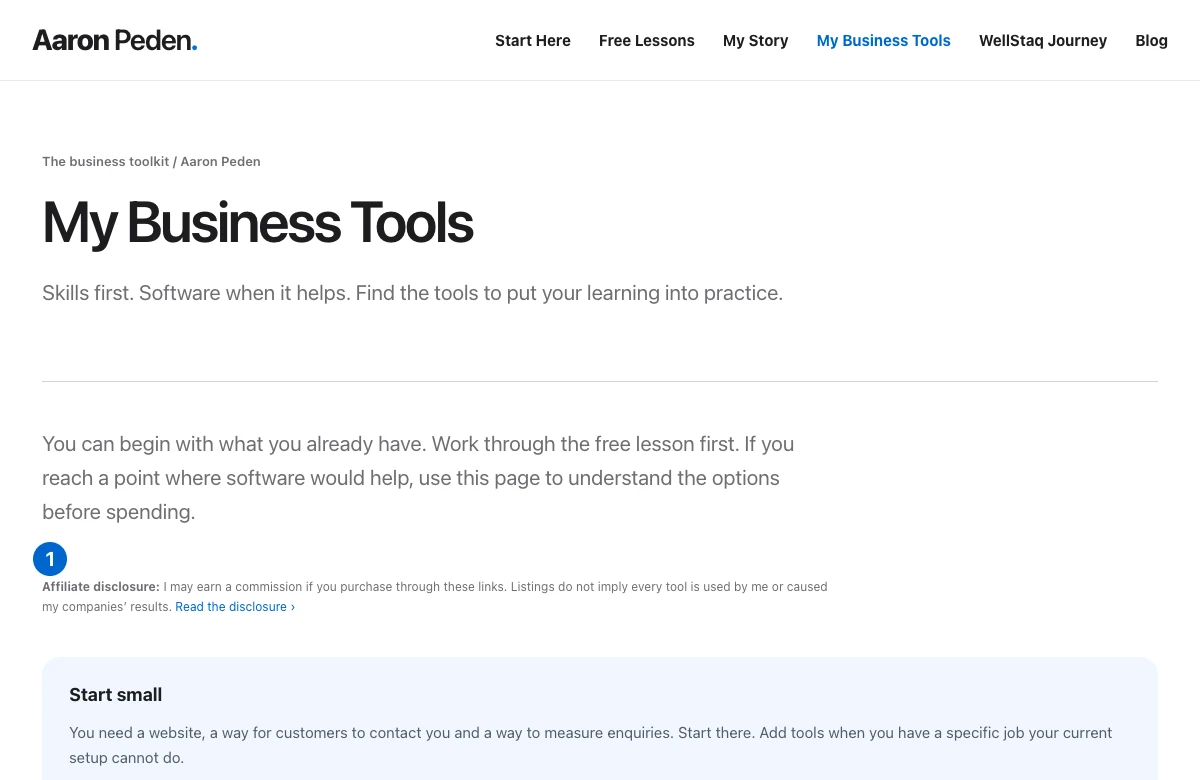
Use plain language explaining the material relationship near the recommendation or link. The actual My Business Tools screenshot shows an affiliate disclosure before the recommendations. Readers should encounter the disclosure before acting, rather than needing to find a separate legal page after clicking.
FTC guidance emphasizes clear disclosure of material relationships. Context and jurisdiction matter, so this article is not a substitute for legal advice. A technical rel attribute is useful machine-readable link information but does not replace a visible explanation to the reader.
Worked example — illustrative or dated as stated
Illustrative comparison: a reader needs a simple welcome sequence and reliable export. Tool A meets both on the required plan; Tool B’s export capability is unverified; the existing platform already meets the need. The honest recommendation may be to keep the existing platform while testing the workflow, even if another product offers a commission.
5. Verify the link and the recommendation fields
Use the approved issued URL exactly and test that it reaches the expected destination without exposing private information. Keep an inventory of product, URL, program status, relationship, rationale, limitations and last check date. Do not invent a referral identifier for a program that has not issued one.
For paid affiliate links, use appropriate sponsored link qualification. If you open a new tab, use a safe opener relationship. Make the link text describe the action. A commission disclosure does not excuse a misleading claim, an irrelevant recommendation or a destination that no longer offers the described product.
6. Maintain the comparison and preserve a skip option
Set review triggers for plan changes, broken links, product closure and new evidence. Keep the original test scope and update the affected claims rather than rewriting everything from memory. A reader should be able to see when a changing fact was checked.
End with who should choose each option and who should buy nothing yet. Link the underlying implementation lesson before the purchase action when useful. The recommendation has done its job if it helps a reader avoid an unnecessary subscription as well as when it earns a commission.
YOUR IMPLEMENTATION WORKSHEET
Build your working document.
Enter planning notes without customer identities or secret values. Your answers stay in this browser and are not saved. Download the completed brief before leaving.
No information is submitted to a server.
Copyable implementation example
Adapt this example to your actual environment and verify its assumptions before use.
<a href="https://example.com/approved-referral"
   rel="sponsored nofollow noopener" target="_blank">
  Review the tool’s current plans
</a>
<!-- Example URL only. Add a visible relationship disclosure nearby. -->
Completion checklist
0 / 8 checkedCheck only what you have verified. Download before leaving; this page does not save your progress.
Sources and scope
Primary-source guidance checked October 27, 2026. Interfaces and policies can change; consult the linked current source. Practice screenshots and modeled examples are labeled and are not client campaign results.