Technical tutorial / Email Marketing
Prepare a Permission-Based Email Campaign from DNS to Test Send
Check sender authentication, audience permission, message scope, suppression and the complete subscriber journey before sending.
By Aaron Peden · Published · Updated October 27, 2026
Build this: A campaign readiness sheet with authentication evidence and a tested unsubscribe path.
Before you start: An email platform account, permission to use the sending domain and a legitimate permission-based audience.
An email campaign has two separate jobs: earn the right to send and deliver a useful message. A polished subject line cannot repair missing authentication or a suppression system that sends again after someone unsubscribes. This tutorial prepares a small campaign without assuming a particular email platform.
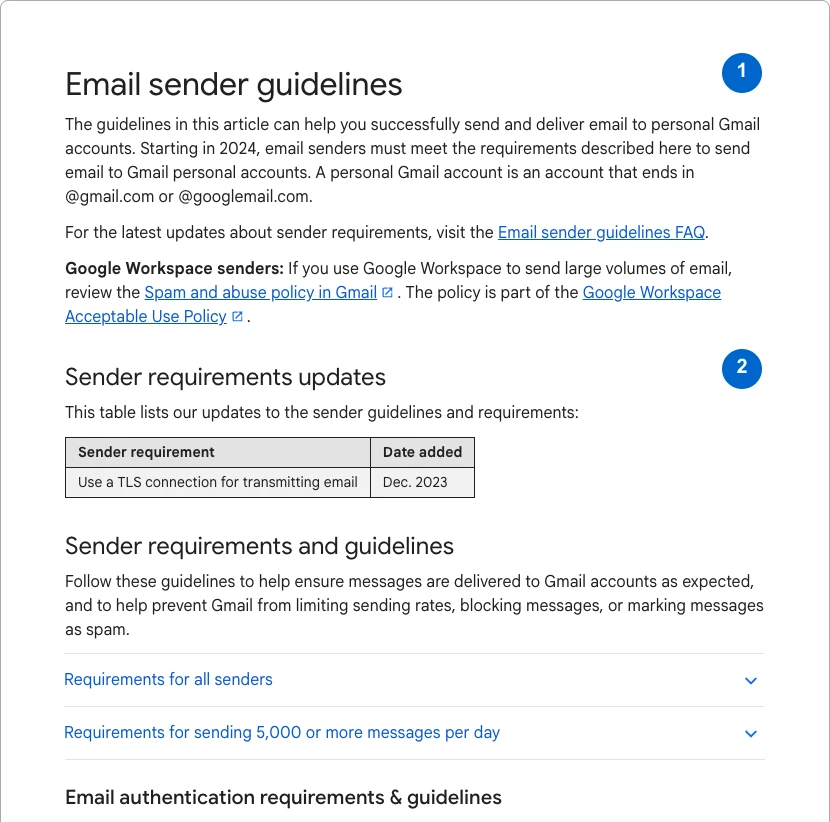
Exact interface labels differ by provider. Use its current domain-authentication and list-management instructions for implementation. Do not paste DNS values from another account or from this example into your domain. The screenshots show real public guidance and this site’s planning worksheet, not access to your email account.
1. Define who can receive this message
Write the audience, why each person expects the message and how permission was recorded. Separate transactional messages from marketing. A purchase does not automatically justify every future promotional message in every jurisdiction. Review applicable rules and your platform’s policies before importing contacts or changing the purpose of a list.
Exclude unsubscribed, complained, bounced and otherwise suppressed contacts according to the provider’s rules. Do not re-import a list to bypass suppression. Keep identities and permission records inside the approved email/customer systems; the worksheet here is for planning notes without subscriber information.
2. Authenticate the sending domain
Open the provider’s domain setup and copy the exact records it issues for your domain. SPF authorizes senders, DKIM signs messages, and DMARC publishes policy and reporting preferences around alignment. Verify existing records before adding anything. Multiple separate SPF records can cause errors; do not blindly append a second one.
Google’s sender guidance distinguishes requirements for all senders from additional requirements for bulk senders. Do not assume a small campaign is exempt from good authentication. Start a DMARC policy change with visibility and coordination across legitimate senders; moving directly to reject without checking them can break valid mail.
See the actual example
3. Verify DNS and a received message
Use your DNS provider’s readback and the command examples to inspect published records. Substitute the actual domain and provider-issued DKIM selector. DNS visibility alone does not prove the received message authenticates correctly, so send a test to an inbox you control and inspect its original headers.
Look for SPF, DKIM and DMARC results plus the aligned domains, not just the display name. Record which sending route was tested. A successful message from one service does not validate a second service using the same brand. Propagation, forwarding and provider configuration can affect the observed result.
4. Write one message for one action
State why the reader is receiving the email, what useful thing it contains and the next step. Use a descriptive subject and recognizable sender identity. The body should stand on its own if images do not load. Add meaningful link text and a readable text alternative where your platform supports it.
For an educational welcome message, the action might be opening the first lesson rather than buying immediately. Do not claim a discount deadline or limited availability unless it is real. Test every destination and tracking parameter. Do not put subscriber names, email addresses or sensitive details into URL query strings used for analytics.
Worked example — illustrative or dated as stated
Illustrative readiness result: SPF and DKIM pass in a test inbox, but the unsubscribe link opens a page without suppressing the contact. The campaign is not ready. Fix and retest suppression before sending to the audience. Authentication passing does not compensate for a broken preference or unsubscribe flow.
5. Test unsubscribe and suppression end to end
Send to your own test subscriber record and follow the unsubscribe process. Confirm the visible confirmation and the platform’s actual suppressed state. Then check that the contact is excluded from the next marketing audience. A working footer link is not enough if a later import silently reactivates the address.
Google’s bulk-sender requirements include additional unsubscribe expectations for applicable marketing/subscribed messages. Verify your provider’s implementation rather than assuming a manually typed footer satisfies them. This tutorial does not send mail, change DNS or connect an email platform on your behalf.
6. Review delivery and useful outcomes
After an authorized send, inspect delivery failures, complaints, unsubscribes and the action the email was meant to enable. Opens can be affected by privacy features and image loading, so do not treat them as a precise count of people who read the message. Reconcile meaningful enquiries or purchases with the customer system.
If problems appear, stop expansion and investigate the affected sending route, audience or content. Preserve the tested version, authentication evidence and suppression result. The next campaign should reuse the verified process rather than repeating setup from memory or blaming the subject line for an infrastructure failure.
YOUR IMPLEMENTATION WORKSHEET
Build your working document.
Enter planning notes without customer identities or secret values. Your answers stay in this browser and are not saved. Download the completed brief before leaving.
No information is submitted to a server.
Copyable implementation example
Adapt this example to your actual environment and verify its assumptions before use.
dig TXT example.com
dig TXT selector._domainkey.example.com
dig TXT _dmarc.example.com
# Replace domain and selector with your actual provider-issued values.
Completion checklist
0 / 8 checkedCheck only what you have verified. Download before leaving; this page does not save your progress.
Sources and scope
Primary-source guidance checked October 27, 2026. Interfaces and policies can change; consult the linked current source. Practice screenshots and modeled examples are labeled and are not client campaign results.