Technical tutorial / Sales & Lead Generation
Build a Sales Pipeline You Can Diagnose
Track contacts, replies, qualified calls, proposals and wins without confusing activity with revenue.
By Aaron Peden · Published · Updated October 27, 2026
Build this: A small pipeline sheet with stage definitions, follow-up dates and diagnostic conversion rates.
Before you start: One defined offer, an approved way to contact relevant prospects and a secure place for customer records.
“We need more leads” can describe several different problems. You may be reaching the wrong people, failing to start conversations, proposing the wrong scope or losing interested buyers during follow-up. A pipeline makes these handoffs visible, provided each stage has a consistent definition.
You do not need a complex CRM to start. You do need accurate records, respectful outreach and clear ownership. Use your approved customer system for identities and contact details. The worksheet here is for non-sensitive planning notes, not a customer database or an outreach sender.
1. Define the stages by observable behavior
Choose a short sequence: relevant contact, reply, qualified conversation, proposal and customer. Write the entry condition for each stage. A reply can be a rejection; a qualified conversation requires an actual fit assessment. A proposal is an offer sent under clear terms, not a promise that the buyer will purchase.
Separate a new paying customer from a verbal yes or a booked call. If your business has an approval or deposit stage, include it explicitly. Too many ambiguous stages create more administration without better decisions. Keep the definitions visible so two team members classify the same opportunity consistently.
2. Build the minimum record
Create columns for internal opportunity reference, source, current stage, stage-entry date, next action, next-action date, owner, expected scope and outcome reason. Store personal information only where authorized. Add a closed-lost state so dead opportunities do not remain permanently inside an optimistic forecast.
Every active opportunity needs a next action owned by a person. “Follow up” is incomplete; “send the agreed scope summary on Thursday” is actionable. If the buyer asked you to stop, record that and honor it. A pipeline is not permission to keep contacting someone indefinitely.
See the actual example
3. Write outreach around a real fit
Explain who you help, the specific problem you address and a low-pressure next step. Use only facts you actually know about the recipient. Avoid fabricated personalization, unverified revenue claims and guarantees. Confirm the contact method is appropriate under applicable rules and platform policies before sending anything.
For example: “We review how independent gyms follow up with trial enquiries. If that is a current issue, would a short outline of the audit be useful?” This is an illustrative structure, not a universally compliant script. Adapt it to the relationship, consent and jurisdiction rather than pasting it into a bulk sender.
4. Qualify before writing a large proposal
During the conversation, establish the current process, recent problem, decision-maker, timing and constraints. Ask what they have already tried and what would make the project successful. Record whether you can actually deliver the requested outcome and whether the scope fits your offer.
Summarize the problem back to the buyer before proposing a solution. If the fit is poor, close the opportunity honestly or refer it appropriately. Counting every conversation as qualified can make marketing appear productive while creating work for sales that cannot turn into suitable customers.
Worked example — illustrative or dated as stated
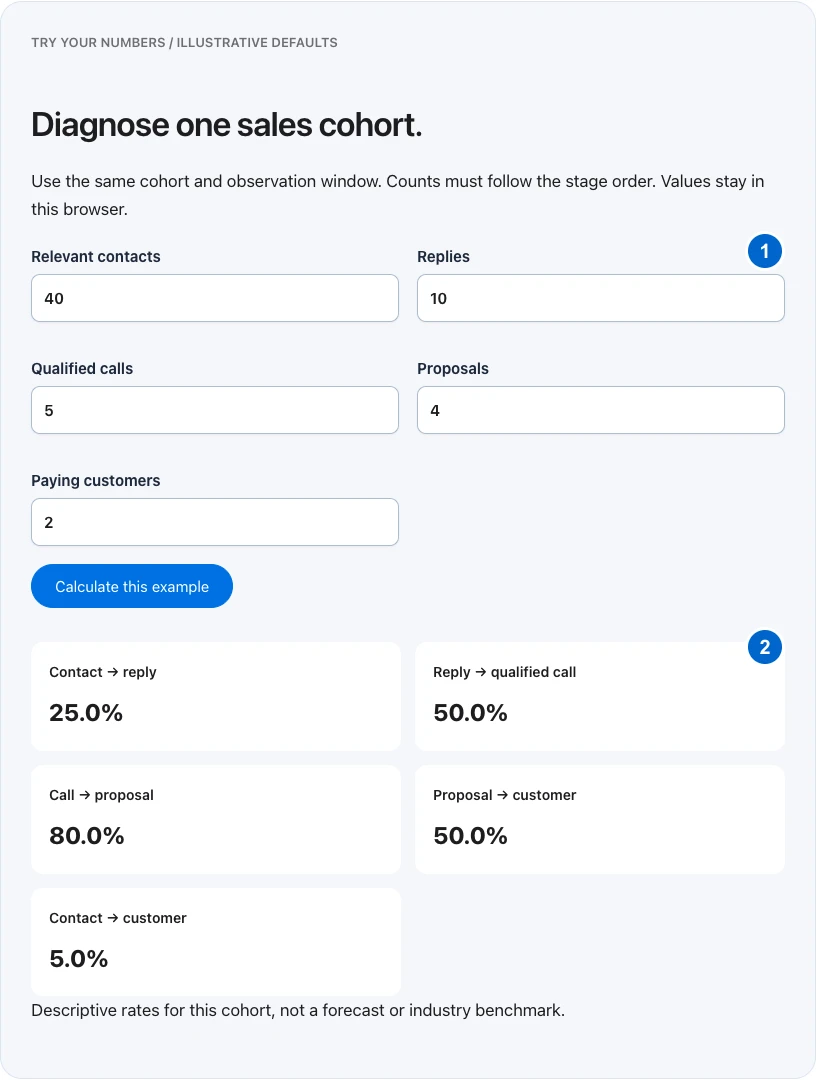
Illustrative cohort: 40 relevant contacts lead to 10 replies, five qualified calls, four proposals and two customers. Reply rate is 25%; reply-to-qualified-call is 50%; proposal-to-customer is 50%. Two customers out of forty contacts is 5%. These rates describe this small fictional cohort and are not performance targets.
5. Calculate rates with the right denominator
For a consistent cohort, divide replies by contacts, qualified calls by replies, proposals by qualified calls and wins by proposals. Do not mix last week’s contacts with this week’s wins when the sales cycle is longer. Track elapsed time and open opportunities so you do not classify pending outcomes as losses.
The pipeline tool below calculates stage-to-stage rates from your entered counts. It is descriptive, not a forecast or a benchmark. A low rate indicates where to investigate; it does not establish the cause. Read the underlying notes before changing the script, audience or price.
6. Review the constraint and the follow-up queue
Once a week, review overdue actions, stalled stages and closed-lost reasons. Look for a specific pattern, such as many suitable calls but repeated confusion about the deliverable. Check the sample size and whether the same person is consistently recording outcomes before treating the pattern as stable.
Choose one process fix and define how you will verify it. You might clarify proposal scope, reduce handoff delay or remove a poor-fit audience. Preserve the previous definitions when making a change so later comparisons are interpretable. A better pipeline improves decisions; it should not become a game of moving cards to make the funnel look fuller.
TRY YOUR NUMBERS / ILLUSTRATIVE DEFAULTS
Diagnose one sales cohort.
Use the same cohort and observation window. Counts must follow the stage order. Values stay in this browser.
YOUR IMPLEMENTATION WORKSHEET
Build your working document.
Enter planning notes without customer identities or secret values. Your answers stay in this browser and are not saved. Download the completed brief before leaving.
No information is submitted to a server.
Completion checklist
0 / 8 checkedCheck only what you have verified. Download before leaving; this page does not save your progress.
Sources and scope
Primary-source guidance checked October 27, 2026. Interfaces and policies can change; consult the linked current source. Practice screenshots and modeled examples are labeled and are not client campaign results.