Technical tutorial / Content Marketing
Turn Customer Questions into a Content Plan That Leads Somewhere
Build a query-to-page map, a useful article brief and a measurable path from learning to the next customer action.
By Aaron Peden · Published · Updated October 27, 2026
Build this: A prioritized content brief with evidence, screenshots, an application asset and a relevant next step.
Before you start: A real customer segment, access to questions they ask and a website where you can maintain the answers.
A content plan is not a spreadsheet of keywords waiting to become articles. It is a map of questions your customers need answered before they can make progress. A useful article helps with one of those questions and offers a natural next action. That action may be another lesson rather than a purchase.
Start with evidence from support, sales conversations, search data or observed workflows. Remove personal information before using it in a brief. If a question is your hypothesis rather than an observed customer need, mark it as such. Search volume estimates are useful context, not proof that a page deserves to exist.
1. Collect questions in the customer’s words
Review recent support requests and sales notes for recurring tasks, objections and points of confusion. Record a short anonymized question, where it came from and the customer’s stage. Prefer “How do I know my enquiry form is working?” over a broad label such as analytics. The former tells you what the article must help someone do.
Group questions that need the same answer. Keep distinct tasks separate: setting up an event and calculating acquisition cost can link to each other without becoming one unfocused article. Do not publish private conversation excerpts without permission. A paraphrased problem is usually enough for planning.
2. Assign each question to an existing or new page
Inventory relevant pages before creating a new URL. Write the main question, intended reader, current answer quality and next step for each. If an existing page already owns the question, improve it rather than publishing a lightly rewritten duplicate. Use a new page when the task or intent is meaningfully different.
Your map should include the page type: tutorial, comparison, definition, case study or product page. A tutorial needs implementation evidence. A comparison needs consistent criteria and limitations. Do not use one generic article template to hide the fact that the reader needs a different kind of answer.
See the actual example
3. Write an outcome-based brief
State what the reader will have built or verified by the end. Add prerequisites, numbered steps, a worked example and a completion check. List the primary sources and the parts that can change with product updates. Specify which screenshot belongs at which step and what it must show, rather than requesting a decorative image about marketing.
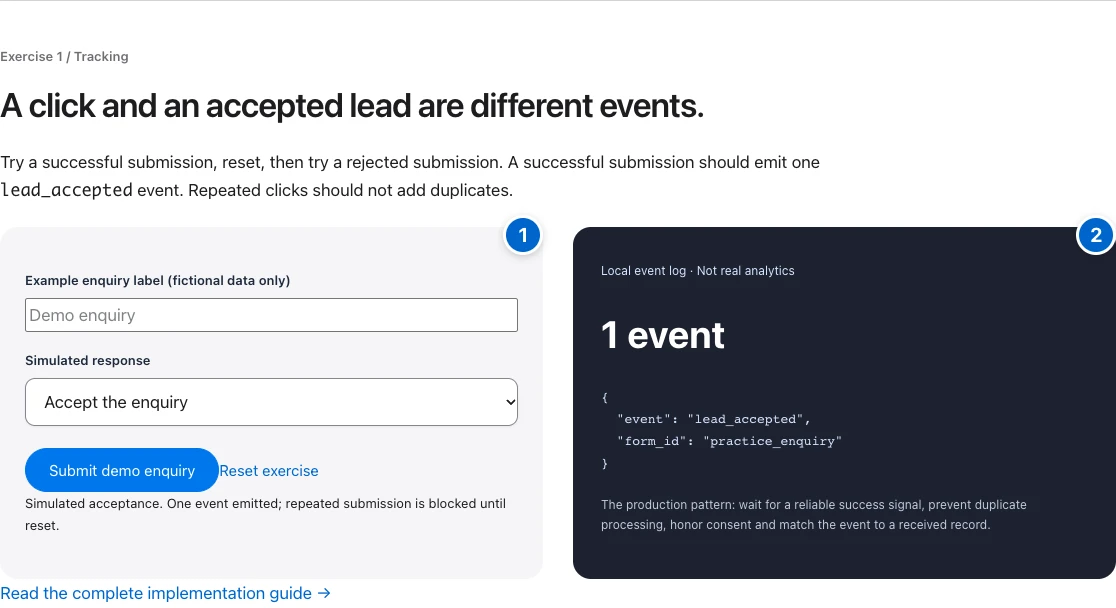
For a tracking article, the visual brief might require an accepted submission, a rejected submission and the event count for each. The existing practice screenshot demonstrates that evidence pattern. It is a simulated exercise, so the caption must say so. A screenshot does not become real client data merely because it looks like software.
4. Build the application asset while drafting
Choose an asset that produces an output: a checklist, code example, worksheet, calculation or test matrix. Make it specific to the task. A content brief should yield a brief; a margin article should calculate margin. Avoid attaching the same calculator to every page because it creates interaction without solving the reader’s problem.
Use the article worksheet below to record the question, evidence, outline and acceptance check. Then test it with the same example used in the article. If the output is too vague to guide another person, improve the prompts before publishing the asset.
Worked example — illustrative or dated as stated
Illustrative brief: “Test an enquiry form without counting failed submissions.” Reader output: a five-case test matrix. Evidence: accepted and rejected screenshots from a labeled practice environment. Application: run the cases and record expected versus actual counts. Next step: configure production measurement with the appropriate privacy and consent controls.
5. Publish with a useful information path
Use a descriptive title and one clear H1. Give the short answer near the top, then let readers navigate the steps. Link prerequisites before they are needed and one next task at the end. Use alt text for meaningful screenshots and captions that explain what the reader should notice.
Verify the public page response, canonical, robots settings, mobile layout and links. Do not remove noindex from private staging as part of a content task. Publishing means the page is available; indexing and ranking are later states that require their own evidence. Submit through approved search workflows only when the public site is ready.
6. Measure usefulness and keep the answer current
Choose signals tied to the article’s job: checklist downloads, movement to the next lesson, accepted enquiries or fewer repeated support problems. Pageviews alone do not prove learning or commercial value. Explain attribution limits and avoid identifying individual readers unless you have a legitimate, disclosed design for doing so.
Schedule review around interface changes, broken examples and new customer questions. Update the visible date when the content actually changes meaningfully, not simply to appear fresh. Keep a short change note and retest the tool. Content becomes an asset when the answer remains dependable after the initial publication.
YOUR IMPLEMENTATION WORKSHEET
Build your working document.
Enter planning notes without customer identities or secret values. Your answers stay in this browser and are not saved. Download the completed brief before leaving.
No information is submitted to a server.
Completion checklist
0 / 8 checkedCheck only what you have verified. Download before leaving; this page does not save your progress.
Sources and scope
Primary-source guidance checked October 27, 2026. Interfaces and policies can change; consult the linked current source. Practice screenshots and modeled examples are labeled and are not client campaign results.